How to determine which version of an Office 2010 product is installed
http://support.microsoft.com/kb/2121559
How to determine which version of a 2007 Office product is installed
http://support.microsoft.com/kb/928116
How to check the version of Office 2003 products
http://support.microsoft.com/kb/821549
How to check the version of Office XP
http://support.microsoft.com/kb/291331
How to determine the version of your Office 2000 program
http://support.microsoft.com/kb/255275
Showing posts with label MS. Show all posts
Showing posts with label MS. Show all posts
Wednesday, February 22, 2012

Monday, February 13, 2012
MS: Hyper-v R2 VM failed to start - Unable to allocate Ram: insufficient system resources - Error 0x800705AA
The Problem:
I have been running lot of VMs on the same Windows 2008 R2 server with Hyper-V role installed since November 2010. I updated server to SP1 a long time ago and keep server updated. No antivirus installed, because this is standalone training server. No Active Directory. Intel Core i7 with 6GB RAM.
On Thursday, I tried to start 4 VMs (usuallyI ran 5 to 7 simultaneous VMs) and when I tried VM #3 I got the following error:
MachineName failed to start
Unable to allocate xxx MB of Ram: insufficient system resources exist to complete the request service (0x800705AA)

So I spent last 4 days going through different tests:
I have been running lot of VMs on the same Windows 2008 R2 server with Hyper-V role installed since November 2010. I updated server to SP1 a long time ago and keep server updated. No antivirus installed, because this is standalone training server. No Active Directory. Intel Core i7 with 6GB RAM.
On Thursday, I tried to start 4 VMs (usuallyI ran 5 to 7 simultaneous VMs) and when I tried VM #3 I got the following error:
MachineName failed to start
Unable to allocate xxx MB of Ram: insufficient system resources exist to complete the request service (0x800705AA)

So I spent last 4 days going through different tests:
- Remove video card driver.
- Disabled all software running on the server (this software was running before)
- Uninstall all software I can.
- Check online for similar issues.
- Modified the cached physical memory reservation (using the registry key), to increase free physical memory.
- Change memory assignment on VM to dynamic.
- Applied few hotfixes (KB983289 and KB979149)
- Check the event viewer for more info
- Verify I have enough space on all disk partitions
- Reinstall Hyper-V
Usually I ran for VMs ( 2 x 512MB of RAM + 2 x 768 RAM) and again I was doing this since November 2010.As you can see below there are plenty of memory available.

Solution:
After 4 days and running out of ideas I posted this issue on the Hyper-V forum and minutes later, Bob Comer a Microsoft MVP Virtual Machine posted that issue was caused by a Google application called GooglecrashHandler.exe
* Open Task Manager and found two process called GooglecrashHandler, killed them and using Autoruns I found they in Task Scheduler. Remove all entries.
* Delete directory D:\Program Files (x86)\Google\Update
* Delete the HKEY_LOCAL_MACHINE\SYSTEM\CurrentControlSet\services\gupdate registry key
* Delete the HKEY_LOCAL_MACHINE\SYSTEM\CurrentControlSet\services\gupdatem registry key
After that I was able to start all VMs. Thanks Bob!
Final Questions:
- So the first question is how a 64k crap process created by Google can cause a problem like this?
- Why this crap is installed on my system when I never installed any Google application?
- And why the damn applications is not show in the Add/Remove Programs in Control Panel?
- Why developers at Google are so BAD creating programs?
- And finally: this issue was caused because Google developers are really f****** i***** or this is intentional?
- Why this process is not considered a spyware or virus for antivirus companies?
Thursday, January 26, 2012
MS: Script Get List .NET Framework version for list of computers
One of my colleague in the WIndows Operations team asked me to create a VBscript to get all .NET Framework Version installed on a list of servers (provided in a .txt file). I created the script using blocks so the team can reuse it for multiples tasks.
To use the script: Cscript NetFramework.vbs, where is the text file with a list of servers or machines.
'--- script start here--
On Error Resume Next
Const HKEY_LOCAL_MACHINE = &H80000002
RegistryRoot= HKEY_LOCAL_MACHINE
Dim NetF(10)
Dim Version(10)
NetF(1) = "SOFTWARE\Microsoft\NET Framework Setup\NDP\v1.1.4322"
Version(1) = "1.1"
NetF(2) = "Software\Microsoft\NET Framework Setup\NDP\v2.0.50727"
Version(2) = "2.0"
NetF(3) = "Software\Microsoft\NET Framework Setup\NDP\v3.0"
Version(3) = "3.0"
NetF(4) = "Software\Microsoft\NET Framework Setup\NDP\v3.5"
Version(4) = "3.5"
NetF(5) = "SOFTWARE\Microsoft\NET Framework Setup\NDP\v4\Client"
Version(5) = "4.0"
NetCount = 5
Set objArgs = WScript.Arguments
if objArgs.Count = 0 then
WScript.Echo "Command line parameters not specified"
WScript.Echo "Usage: Cscript NetFramework.vbs"
WScript.quit
end if
ServerList = trim(objArgs(0))
OutputFile = "NetF-Report.csv"
'Create Header
Header="ServerName"
For I=1 to NetCount
Header=Header & "," & Version(I)
Next
'Record loop for servers
Set objFSO = CreateObject("Scripting.FileSystemObject")
Set objInFile = objFSO.OpenTextFile(ServerList, 1)
Info=Header & vbcrlf & CSVLine
Do Until objInFile.AtEndOfStream
strLine = objInFile.ReadLine
strComputer = strLine
wscript.echo "Checking machine " & Ucase(strComputer)
Info = Info & GetServerInfo(strComputer) & vbcrlf & CSVLine
Loop
'delete existing report file
objFSO.DeleteFile(OutputFile)
'create new report file
Set objFile = objFSO.CreateTextFile(OutputFile)
objFile.Write Info
objFile.Close
'*********************
'** Get Server Info **
'*********************
function GetServerInfo(ServerName)
Result=ServerName
if Ping(ServerName)=True then
For I=1 to NetCount
if ReadReg(ServerName, RegistryRoot, NetF(I), "Install")=True then
SPVersion=ReadRegValue(ServerName, RegistryRoot, NetF(I), "SP")
if SPVersion>0 then
Result=Result & ",SP" & SPVersion
else
Result=Result & ",NO SP"
end if
else
Result=Result & ",No"
end if
Next
else
Result = Result & ",N/A"
end if
GetServerInfo = Result
end function
'*******************
'** Read Registry **
'*******************
Function ReadReg(strComputer, RegistryRoot, strKeyPath, strValueName)
Set objRegistry = GetObject("winmgmts:\\" & strComputer & "\root\default:StdRegProv")
objRegistry.GetDWordValue RegistryRoot,strKeyPath,strValueName,strValue
If IsNull(strValue) Then
ReadReg = False
Else
ReadReg = True
End If
End Function
'*************************
'** Read Registry Value **
'*************************
Function ReadRegValue(strComputer, RegistryRoot, strKeyPath, strValueName)
Set objRegistry = GetObject("winmgmts:\\" & strComputer & "\root\default:StdRegProv")
objRegistry.GetDWordValue RegistryRoot,strKeyPath,strValueName,strValue
ReadRegValue = strValue
End Function
'******************
'** Ping Machine **
'******************
Function Ping(strHost)
Dim objPing, objRetStatus
Set objPing = GetObject("winmgmts:{impersonationLevel=impersonate}").ExecQuery _
("select * from Win32_PingStatus where address = '" & strHost & "'")
for each objRetStatus in objPing
if IsNull(objRetStatus.StatusCode) or objRetStatus.StatusCode<>0 then
Ping = False
else
Ping = True
end if
next
End Function
To use the script: Cscript NetFramework.vbs
'--- script start here--
On Error Resume Next
Const HKEY_LOCAL_MACHINE = &H80000002
RegistryRoot= HKEY_LOCAL_MACHINE
Dim NetF(10)
Dim Version(10)
NetF(1) = "SOFTWARE\Microsoft\NET Framework Setup\NDP\v1.1.4322"
Version(1) = "1.1"
NetF(2) = "Software\Microsoft\NET Framework Setup\NDP\v2.0.50727"
Version(2) = "2.0"
NetF(3) = "Software\Microsoft\NET Framework Setup\NDP\v3.0"
Version(3) = "3.0"
NetF(4) = "Software\Microsoft\NET Framework Setup\NDP\v3.5"
Version(4) = "3.5"
NetF(5) = "SOFTWARE\Microsoft\NET Framework Setup\NDP\v4\Client"
Version(5) = "4.0"
NetCount = 5
Set objArgs = WScript.Arguments
if objArgs.Count = 0 then
WScript.Echo "Command line parameters not specified"
WScript.Echo "Usage: Cscript NetFramework.vbs
WScript.quit
end if
ServerList = trim(objArgs(0))
OutputFile = "NetF-Report.csv"
'Create Header
Header="ServerName"
For I=1 to NetCount
Header=Header & "," & Version(I)
Next
'Record loop for servers
Set objFSO = CreateObject("Scripting.FileSystemObject")
Set objInFile = objFSO.OpenTextFile(ServerList, 1)
Info=Header & vbcrlf & CSVLine
Do Until objInFile.AtEndOfStream
strLine = objInFile.ReadLine
strComputer = strLine
wscript.echo "Checking machine " & Ucase(strComputer)
Info = Info & GetServerInfo(strComputer) & vbcrlf & CSVLine
Loop
'delete existing report file
objFSO.DeleteFile(OutputFile)
'create new report file
Set objFile = objFSO.CreateTextFile(OutputFile)
objFile.Write Info
objFile.Close
'*********************
'** Get Server Info **
'*********************
function GetServerInfo(ServerName)
Result=ServerName
if Ping(ServerName)=True then
For I=1 to NetCount
if ReadReg(ServerName, RegistryRoot, NetF(I), "Install")=True then
SPVersion=ReadRegValue(ServerName, RegistryRoot, NetF(I), "SP")
if SPVersion>0 then
Result=Result & ",SP" & SPVersion
else
Result=Result & ",NO SP"
end if
else
Result=Result & ",No"
end if
Next
else
Result = Result & ",N/A"
end if
GetServerInfo = Result
end function
'*******************
'** Read Registry **
'*******************
Function ReadReg(strComputer, RegistryRoot, strKeyPath, strValueName)
Set objRegistry = GetObject("winmgmts:\\" & strComputer & "\root\default:StdRegProv")
objRegistry.GetDWordValue RegistryRoot,strKeyPath,strValueName,strValue
If IsNull(strValue) Then
ReadReg = False
Else
ReadReg = True
End If
End Function
'*************************
'** Read Registry Value **
'*************************
Function ReadRegValue(strComputer, RegistryRoot, strKeyPath, strValueName)
Set objRegistry = GetObject("winmgmts:\\" & strComputer & "\root\default:StdRegProv")
objRegistry.GetDWordValue RegistryRoot,strKeyPath,strValueName,strValue
ReadRegValue = strValue
End Function
'******************
'** Ping Machine **
'******************
Function Ping(strHost)
Dim objPing, objRetStatus
Set objPing = GetObject("winmgmts:{impersonationLevel=impersonate}").ExecQuery _
("select * from Win32_PingStatus where address = '" & strHost & "'")
for each objRetStatus in objPing
if IsNull(objRetStatus.StatusCode) or objRetStatus.StatusCode<>0 then
Ping = False
else
Ping = True
end if
next
End Function
Thursday, November 03, 2011
VMware: Windows 2008 R2 SP1 memory issues on VMware ESX 3.5
Definitely there is an issue running Windows 2008 R2 Service Pack 1 (SP1) VM on ESX 3.5.
We have several VMs running SQL Server, IIS, SharePoint and Project Servers. After lot of timeout issues, I decided to spend a couple of hours to research where the issue is.
I saw the VM is using almost all memory and only 25MB of free memory is available.
I started disabling all services (IIS, SharePoint, SQL, Antivirus) and rebooted server. Server still using around 3.8 GB of RAM of 4GB.
Rebooted on safe mode, using 380 MB! Rebooted on safe mode with networking around 460 MB!
Then I compared with others servers (1 VM and 1 physical server). Same issue on the VM, but physical server was using around 800MB of RAM.
I decided to uninstall VM Tools and viola! Issue resolved.
We have several VMs running SQL Server, IIS, SharePoint and Project Servers. After lot of timeout issues, I decided to spend a couple of hours to research where the issue is.
I saw the VM is using almost all memory and only 25MB of free memory is available.
I started disabling all services (IIS, SharePoint, SQL, Antivirus) and rebooted server. Server still using around 3.8 GB of RAM of 4GB.
Rebooted on safe mode, using 380 MB! Rebooted on safe mode with networking around 460 MB!
Then I compared with others servers (1 VM and 1 physical server). Same issue on the VM, but physical server was using around 800MB of RAM.
I decided to uninstall VM Tools and viola! Issue resolved.
Monday, August 01, 2011
MS: The WMI Performance Adapter service fill up the System event
Issue:
You found the System Event Viewer full of events related with the WMI Performance Adapter service. The service start and stop every 5 minutes.
Events are:
Log Name: System
Source: Service Control Manager
Event ID: 7036
Task Category: None
Level: Information
Keywords: Classic
User: N/A
Description: The WMI Performance Adapter service entered the stopped state.
and
Log Name: System
Source: Service Control Manager
Event ID: 7036
Task Category: None
Level: Information
Keywords: Classic
User: N/A
Description: The WMI Performance Adapter service entered the running state.
Solution:
Set the WMI Performance Adapter service Startup Mode to Automatic
You found the System Event Viewer full of events related with the WMI Performance Adapter service. The service start and stop every 5 minutes.
Events are:
Log Name: System
Source: Service Control Manager
Event ID: 7036
Task Category: None
Level: Information
Keywords: Classic
User: N/A
Description: The WMI Performance Adapter service entered the stopped state.
and
Log Name: System
Source: Service Control Manager
Event ID: 7036
Task Category: None
Level: Information
Keywords: Classic
User: N/A
Description: The WMI Performance Adapter service entered the running state.
Solution:
Set the WMI Performance Adapter service Startup Mode to Automatic
Friday, July 08, 2011
DEV: Windows Phone 7 Development Tools
30+ Excellent Windows Phone 7 Development Tutorials
http://blogs.msdn.com/b/lebanon/archive/2011/01/03/30-excellent-windows-phone-7-development-tutorials.aspx
Windows Phone Programming in VB.NET
http://www.myvbprof.com/MainSite/index.aspx#/zWP7_Part1
Sqlite Client for Windows Phone
http://sqlitewindowsphone.codeplex.com/
http://blogs.msdn.com/b/lebanon/archive/2011/01/03/30-excellent-windows-phone-7-development-tutorials.aspx
Windows Phone Programming in VB.NET
http://www.myvbprof.com/MainSite/index.aspx#/zWP7_Part1
Sqlite Client for Windows Phone
http://sqlitewindowsphone.codeplex.com/
Sunday, July 03, 2011
MS: IIS error Unrecognized attribute 'targetFramework'. Note that attribute names are case-sensitive
After install .NET Framework 4.0 on IIS 7 and deploying a .NET 4.0 (Visual Studio 2010) web site, you receive the following error: "Unrecognized attribute 'targetFramework'. Note that attribute names are case-sensitive"
Solution:
Select the site and on the Actions pane select Basic Settings. Use the Select button on the Application Pool to change the DefaultAppPool to ASP.NET v4.0
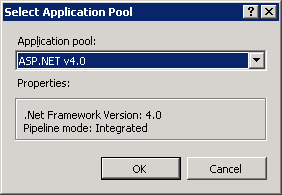
Restart the IIS site.
Solution:
Select the site and on the Actions pane select Basic Settings. Use the Select button on the Application Pool to change the DefaultAppPool to ASP.NET v4.0

Restart the IIS site.
Monday, June 27, 2011
MS: SharePoint 2010 Configuration Failed - Failed to Create the Configuration Database
When you try to configure SharePoint 2010 to connect to a SQL Server using a non standard port, you will receive an error: Failed to create the configuration database.
An exception of type System.ArgumentException was thrown. Additional exception information: [Server Name or IP Address],[Port] is an invalid or loopback access. Specify a valid server address.
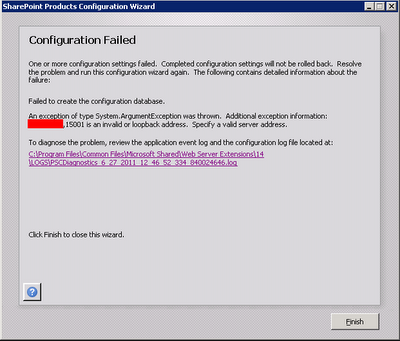 Solution:
An exception of type System.ArgumentException was thrown. Additional exception information: [Server Name or IP Address]
Solution:- Open odbcad32 tool.
- Select the System DSN tab.
- Add a new System Data Source: SQL Server.
- Type the SQL server name on both Name and Server fields on the fist page.
- On the second page, click on the Client Configuration button, unchecks the Dynamically Determine Port checkbox and enter the port number.
Tuesday, February 01, 2011
MS: Events 1085 and 8194 on Windows 2008 - Group Policy Issues
A full hard disk caused the following errors to appears on event viewer in a Windows Server 2008 running Terminal Server and Citrix XenApp. The lack of space caused a GPO corruption on the server.

Log Name: System
Source: Microsoft-Windows-GroupPolicy
Event ID: 1085
Level: Warning
Description:Windows failed to apply the Group Policy "MyPolicy" settings. Group Policy "MyPolicy" settings might have its own log file. Please click on the "More information" link.

Log Name: Application
Source: Group Policy Start Menu Settings
Event ID: 8194
Level: Error
Description: The client-side extension could not remove user policy settings for 'MyPolicy' because it failed with error code '0x8007000d The data is invalid.' See trace file for more details.
SOLUTION: Delete the content of folder C:\ProgramData\Microsoft\Group Policy\History, run GPUPDATE /FORCE and reboot server.

Log Name: System
Source: Microsoft-Windows-GroupPolicy
Event ID: 1085
Level: Warning
Description:Windows failed to apply the Group Policy "MyPolicy" settings. Group Policy "MyPolicy" settings might have its own log file. Please click on the "More information" link.

Log Name: Application
Source: Group Policy Start Menu Settings
Event ID: 8194
Level: Error
Description: The client-side extension could not remove user policy settings for 'MyPolicy' because it failed with error code '0x8007000d The data is invalid.' See trace file for more details.
SOLUTION: Delete the content of folder C:\ProgramData\Microsoft\Group Policy\History, run GPUPDATE /FORCE and reboot server.
Wednesday, December 15, 2010
MS: set color quality to 32 bit when RDP VMware VMs
When I RDP a VMware Virtual Machine (VM) running Windows Server 2008. The color quality is 16 bit even if we set 32 bit on Remote Desktop Client.
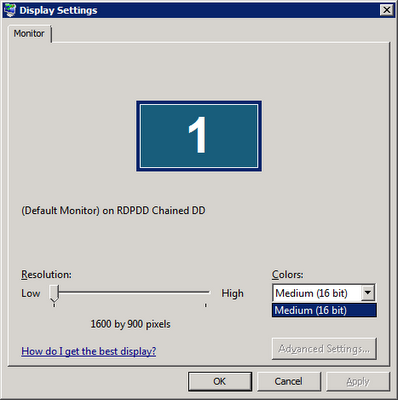
Solution: modify the local policy using gpedit.msc and modify following policy:
Computer Configuration, Administrative Templates, Windows Components, Terminal Services, Terminal Server, Remote Session Environment
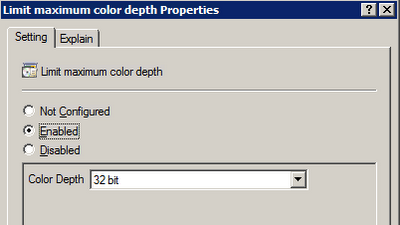
Solution: modify the local policy using gpedit.msc and modify following policy:
Computer Configuration, Administrative Templates, Windows Components, Terminal Services, Terminal Server, Remote Session Environment

MS: Report items amount and size of each manage folder in Exchange
This powershell script will show how many items and size of each managed folder of all users in a Exchange 2007/2010 organization.
Get-Mailbox foreach { $mbx = $_.DisplayName; Get-MailboxFolderStatistics $_.identity -FolderScope 'Managed Folders' select @{n="DisplayName";e={$mbx}},FolderPath,ItemsInFolder,@{n="FolderSize(MB)";e={$_.folderSize.toMB()}}} export-csv c:\reports\ManagedFolders_12152010.csv
Get-Mailbox foreach { $mbx = $_.DisplayName; Get-MailboxFolderStatistics $_.identity -FolderScope 'Managed Folders' select @{n="DisplayName";e={$mbx}},FolderPath,ItemsInFolder,@{n="FolderSize(MB)";e={$_.folderSize.toMB()}}} export-csv c:\reports\ManagedFolders_12152010.csv
Monday, December 13, 2010
MS: Windows 2008 Profile Loading Error
Check Profile List and delete key with .bak at the end.
HKEY_LOCAL_MACHINE\SOFTWARE\Microsoft\Windows NT\CurrentVersion\ProfileList
HKEY_LOCAL_MACHINE\SOFTWARE\Microsoft\Windows NT\CurrentVersion\ProfileList
Tuesday, November 30, 2010
MS: E-mail Records Management and E-mail Retention
Great posts of Adam Harmetz @ Microsoft Records Management Team Blog about e-mail retention in Exchange 2007:
http://blogs.msdn.com/b/recman/archive/2006/12/19/email-records-management-part-1.aspx
http://blogs.msdn.com/b/recman/archive/2007/01/05/e-mail-records-management-part-2.aspx
http://blogs.msdn.com/b/recman/archive/2007/01/18/e-mail-records-management-part-3-e-mail-retention.aspx
http://blogs.msdn.com/b/recman/archive/2006/12/19/email-records-management-part-1.aspx
http://blogs.msdn.com/b/recman/archive/2007/01/05/e-mail-records-management-part-2.aspx
http://blogs.msdn.com/b/recman/archive/2007/01/18/e-mail-records-management-part-3-e-mail-retention.aspx
MS: Create a Managed Folder Mailbox Policy on Exchange 2007 or 2010
Create a Managed Folder Mailbox Policy on Exchange 2007 or 2010
Create a Managed Custom Folder
>> Open Exchange Management Console.
>> Expand the Organization Configuration node and then click Mailbox.
>> Click in Managed Custom Folder tab
>> Right-click and choose the New Managed Custom Folder
>> The New Managed Custom Folder wizard appears. Complete required information.
Also we can use the following example cmdlet:
New-ManagedFolder -Name '3 Months Retention' -FolderName '3 Months Retention' StorageQuota 'unlimited'
Create a Managed Folder Mailbox Policy
>> Open Exchange Management Console.
>> Expand the Organization Configuration node and then click Mailbox.
>> Click in Managed Folder Mailbox Policies tab
>> Right-click and choose the New Managed Folder Mailbox Policy
>> The New Managed Folder Mailbox Policy wizard appears. Complete required information.
Also we can use the following example cmdlet:
new-ManagedFolderMailboxPolicy -Name "RetentionPolicy" -ManagedFolderLinks "3 Months Retention"
Assign the policy to a mailbox
>> Open Exchange Management Console.
>> Expand Recipient Configuration.
>> Double click on the desired mailbox.
>> Click on Mailbox Settings tab.
>> Select Message Records Management.
>> Click on Properties button.
>> Select the Managed Folder Mailbox Policy and make sure that Managed folder mailbox policy checkbox is checked.
Also we can use the following example cmdlet to apply to policy to a single mailbox:
Set-Mailbox -Identity GMusumeci -ManagedFolderMailboxPolicy "RetentionPolicy"
The following example cmdlet apply to policy to multiple mailboxes:
Get-Mailbox -database "EXCHSRV01\Storage Group 1\Mailbox Database 1" Set-Mailbox -ManagedFolderMailboxPolicy "RetentionPolicy"
Force the updates
We can force at server level or user level, using following two cmdlets:
Start-ManagedFolderAssistant –Identity EXCHSRV01
Start-ManagedFolderAssistant –Mailbox GMusumeci
Create a Managed Custom Folder
>> Open Exchange Management Console.
>> Expand the Organization Configuration node and then click Mailbox.
>> Click in Managed Custom Folder tab
>> Right-click and choose the New Managed Custom Folder
>> The New Managed Custom Folder wizard appears. Complete required information.
Also we can use the following example cmdlet:
New-ManagedFolder -Name '3 Months Retention' -FolderName '3 Months Retention' StorageQuota 'unlimited'
Create a Managed Folder Mailbox Policy
>> Open Exchange Management Console.
>> Expand the Organization Configuration node and then click Mailbox.
>> Click in Managed Folder Mailbox Policies tab
>> Right-click and choose the New Managed Folder Mailbox Policy
>> The New Managed Folder Mailbox Policy wizard appears. Complete required information.
Also we can use the following example cmdlet:
new-ManagedFolderMailboxPolicy -Name "RetentionPolicy" -ManagedFolderLinks "3 Months Retention"
Assign the policy to a mailbox
>> Open Exchange Management Console.
>> Expand Recipient Configuration.
>> Double click on the desired mailbox.
>> Click on Mailbox Settings tab.
>> Select Message Records Management.
>> Click on Properties button.
>> Select the Managed Folder Mailbox Policy and make sure that Managed folder mailbox policy checkbox is checked.
Also we can use the following example cmdlet to apply to policy to a single mailbox:
Set-Mailbox -Identity GMusumeci -ManagedFolderMailboxPolicy "RetentionPolicy"
The following example cmdlet apply to policy to multiple mailboxes:
Get-Mailbox -database "EXCHSRV01\Storage Group 1\Mailbox Database 1" Set-Mailbox -ManagedFolderMailboxPolicy "RetentionPolicy"
Force the updates
We can force at server level or user level, using following two cmdlets:
Start-ManagedFolderAssistant –Identity EXCHSRV01
Start-ManagedFolderAssistant –Mailbox GMusumeci
Tuesday, November 23, 2010
MS: Get Exchange Mailbox Info (Exchange 2007 / 2010 or later)
This PowerShell script show the size of the Inbox folder and export the result to CSV file (excel)
Get-Mailbox foreach { $mbx = $_.DisplayName; Get-MailboxFolderStatistics $_.identity -FolderScope 'Inbox' select @{n="DisplayName";e={$mbx}},FolderPath,ItemsInFolder,@{n="FolderSize(MB)";e={$_.folderSize.toMB()}}} export-csv c:\Inbox.csv
This is another script to show the size of the Inbox folder and export the result to CSV file (excel)
Get-Mailbox -ResultSize Unlimited Select-Object Name, @{n='Inbox';e={(Get-MailboxFolderStatistics $_.Identity -FolderScope Inbox).FolderAndSubfolderSize.ToMb() }} Export-Csv c:\Inbox.csv -NoTypeInformation
Get-Mailbox foreach { $mbx = $_.DisplayName; Get-MailboxFolderStatistics $_.identity -FolderScope 'Inbox' select @{n="DisplayName";e={$mbx}},FolderPath,ItemsInFolder,@{n="FolderSize(MB)";e={$_.folderSize.toMB()}}} export-csv c:\Inbox.csv
This is another script to show the size of the Inbox folder and export the result to CSV file (excel)
Get-Mailbox -ResultSize Unlimited Select-Object Name, @{n='Inbox';e={(Get-MailboxFolderStatistics $_.Identity -FolderScope Inbox).FolderAndSubfolderSize.ToMb() }} Export-Csv c:\Inbox.csv -NoTypeInformation
Wednesday, November 10, 2010
CTX: How to Import ICAClient.adm file into Active Directory to modify Citrix Plug-in client settings using GPO
How to Import ICAClient.adm file into Active Directory to modify Citrix Plug-in (formerly known as ICA Client) client settings using GPO.
http://xenapp6.musumeci.com.ar/TechnicalNotes/How_to_Import_ICAClient.adm_file.html
http://xenapp6.musumeci.com.ar/TechnicalNotes/How_to_Import_ICAClient.adm_file.html
Tuesday, November 09, 2010
MS: Unnamed VM could not initialize error on Hyper-V
When you migrate or move (manually) virtual machines, between different hard disks or servers, you will receive the following error:
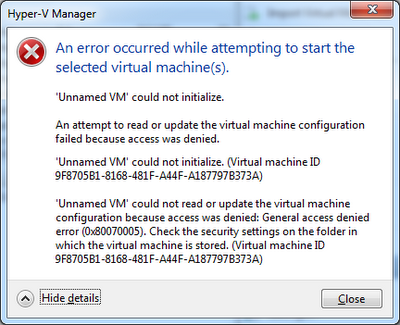
Solution: Download Hyper-V Unnamed VM Fix tool from http://ctxadmtools.musumeci.com.ar/HyperVHotFixes
An error occurred while attempting to start the selected virtual machine(s).
Unnamed VM could not initialize.

Solution: Download Hyper-V Unnamed VM Fix tool from http://ctxadmtools.musumeci.com.ar/HyperVHotFixes
Monday, October 25, 2010
CTX: SMB Tuning for XenApp and File Servers on Windows Server 2008
SMB Tuning for XenApp and File Servers on Windows Server 2008
http://community.citrix.com/display/ocb/2010/10/21/SMB+Tuning+for+XenApp+and+File+Servers+on+Windows+Server+2008
http://community.citrix.com/display/ocb/2010/10/21/SMB+Tuning+for+XenApp+and+File+Servers+on+Windows+Server+2008
Monday, September 13, 2010
MS: A reboot from previous installation is pending on Exchange 2007
When you try to install a Exchange 2007 component like Management Tools, you will receive a message: A reboot from previous installation is pending. Please restart the system and rerun setup.
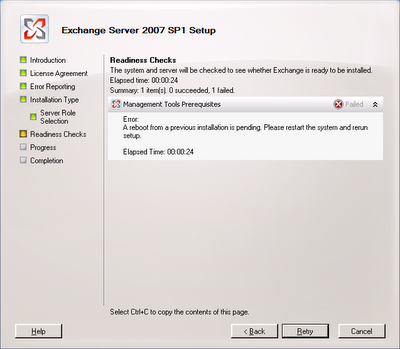 Solution:
1) Remove an orphaned UpdateExeVolatile registry key value
Navigate to HKLM\SOFTWARE\Microsoft\Updates\
In the right navigation pane, double-click the UpdateExeVolatile key and configure the key with a value of 0
2) Delete the orphaned PendingFileRenameOperations registry key
Navigate to HKLM\SYSTEM\CurrentControlSet\Control\Session Manager\, right-click the PendingFileRenameOperations key and select Delete.
 Solution:
1) Remove an orphaned UpdateExeVolatile registry key value
Navigate to HKLM\SOFTWARE\Microsoft\Updates\
In the right navigation pane, double-click the UpdateExeVolatile key and configure the key with a value of 0
2) Delete the orphaned PendingFileRenameOperations registry key
Navigate to HKLM\SYSTEM\CurrentControlSet\Control\Session Manager\, right-click the PendingFileRenameOperations key and select Delete.
Wednesday, September 01, 2010
MS: How to Setup a KMS Server for Office 2010
This technical note included:
- How to Install a Windows Server 2008 / 2008 R2 KMS Server
- Install Office 2010 licenses in the KMS Server

We need to deploy a KMS Server for Office 2010 if we planning to deploy Office 2010 as streaming application in Citrix or App-V.
http://xenapp6.musumeci.com.ar/TechnicalNotes/How_to_Setup_a_KMS_Server_for_Office_2010.html
Subscribe to:
Posts (Atom)