Guillermo
Showing posts with label SQL Server. Show all posts

Monday, June 27, 2011

MS: SharePoint 2010 Configuration Failed - Failed to Create the Configuration Database

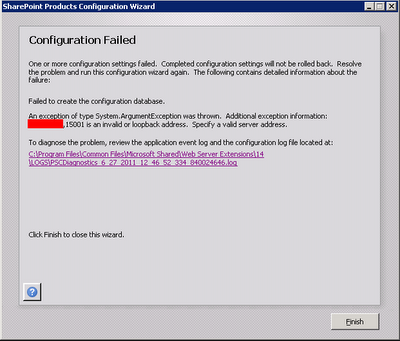
When you try to configure SharePoint 2010 to connect to a SQL Server using a non standard port, you will receive an error: Failed to create the configuration database.

An exception of type System.ArgumentException was thrown. Additional exception information: [Server Name or IP Address],[Port] is an invalid or loopback access. Specify a valid server address.

Solution:

  • Open odbcad32 tool.


  • Select the System DSN tab.


  • Add a new System Data Source: SQL Server.


  • Type the SQL server name on both Name and Server fields on the fist page.


  • On the second page, click on the Client Configuration button, unchecks the Dynamically Determine Port checkbox and enter the port number.

Sunday, July 11, 2010

CTX: How to Create a Citrix Data store in SQL Server 2008 R2

How to Create a Citrix Data store in SQL Server 2008 R2

This procedure explains how to create a Citrix Data Store in SQL Server 2008 step by step.

The technical note is available
Here

Thursday, January 07, 2010

MS: Could not load file or assembly 'Microsoft.SqlServer.Sqm

When you try to run SQL 2008 Management Studio on Windows 2008 R2 x64 you receive this error:

Microsoft SQL Server Management Studio
Cannot show requested dialog.

Could not load file or assembly 'Microsoft.SqlServer.Sqm, Version=10.0.0.0, Culture=neutral, PublicKeyToken=89845dcd8080cc91' or one of its dependencies. The module was expected to contain an assembly manifest. (SqlMgmt)

Solution:

Copy the file Microsoft.SqlServer.Sqm.dll located on C:\Program Files\Microsoft SQL Server\100\Shared to folder C:\Program Files\Microsoft SQL Server\100\Tools\Binn\VSShell\Common7\IDE and C:\Program Files (x86)\Microsoft SQL Server\100\Tools\Binn\VSShell\Common7\IDE. The file size inside these 2 folders should be 0 bytes.

Friday, August 21, 2009

MS: Install SQL Server 2008 on Windows 2008 R2

Install .NET Framework 3.5.1 on Windows 2008 R2 (Features)

Install SQL Server 2008 with SP1. You must slipstream SP1 on SQL Server 2008 RTM image.

Check How to update or slipstream an installation of SQL Server 2008
http://support.microsoft.com/kb/955392