Guillermo
Showing posts with label CtxAdmTools. Show all posts

Sunday, November 17, 2013

CtxAdmTools TS and RDS License Manager v1.0

CtxAdmTools TS and RDS License Manager v1.0


This FREE tool manage servers and desktops TS and RDS licensing from one console

Release Date: Saturday, November 16, 2013

Manage Terminal Server and Remote Desktop Services licensing from ONE single console

TS and RDS License Manager Console

on multiple Windows server and desktop versions

Do more in less time:

Scan your AD domain or file list of machines to create an inventory of your machines.
Asset Management. Export inventory of TS and RDS servers to Excel file.
Enable or disable Remote Desktop on remote Windows server and desktop machines.
Configure TS or RDS license servers on remote Windows servers.
Change TS or RDS license mode to Per Device Mode or Per User Mode.
Launch Remote Desktop session of selected Windows server and desktop machines.
Detect and fix license issues on your Citrix XenApp and XenDesktop farms.

Simple.
Enable Remote Desktop on remote machines with just one click.
Discover more features.

Enable TS and RDS remotely

Quick. Save your time.
Change TS and RDS license mode in 3 seconds instead of 5 minutes.
Compare features.

Change TS and RDS License Mode

Compatible with all modern Windows OS versions

TS and RDS License Manager supports following Windows server versions:
Windows 2000 Server, Windows Server 2003 / 2003 R2, Windows Server 2008 / 2008 R2 and Windows Server 2012 / 2012 R2.

Also, following Windows desktop OS are supported: Windows XP, Windows Vista, Windows 7 and Windows 8.

Learn more about TS and RDS License Manager

Tuesday, September 10, 2013

CtxAdmTools: AD Group Members v2.0 released!

AD Group Members v2.0


This FREE tool list Members of Active Directory Groups

Download at http://www.ctxadmtools.com

Release Date: September 2013

Do you have hundred of AD Groups and you want to check membership of users?

You can search Active Directory Groups, List Members and export results to Excel files.

New features included on the new version 2.0:

New Metro Interface inspired by Windows 8 and Windows Phone Metro UI.

Active Directory browser help you choose the OU to search groups:

AD Browser

Allow unsupported characters in AD Group Names: if your organization uses groups names with unsupported characters most of scripts and tools (including the previous version of AD Group Members) will fail. (Available on Full Version only)

Faster: now AD Group Members is 40-60% faster than version 1.0!

Load AD Groups button: Search and List All Groups in Active Directory or the OU specified using the AD browser.

Load AD Groups

Filter AD Groups textbox: Search and filter AD groups based on the name.

List Group Members button: List members of selected AD group(s).

Clear Lists button: clear both AD Groups and AS Members windows.

Remove Duplicates button: Remove duplicate members.

Export Excel button: Save the information to a Excel file. (Available in the Full version only)


Cancel Search button: Interrupt the search. 

Show AD Group Membership checkbox: show users and groups names.


Wednesday, April 24, 2013

My new www.ctxadmtools.com site is live with a new Metro style look!


CtxAdmTools is getting a new face! The new site www.ctxadmtools.com is inspired on the new Windows 8 Metro UI Style. The theme is responsible (adapt the content to the size of the screen) and works perfect on mobile phones and tablets.

The site was tested intensively on IE6, IE7, IE8, IE9, IE10, FireFox, Safari, Chrome and mobile devices (iPad, iPhone, Windows Mobile, etc).

Monday, November 08, 2010

CtxAdmTools: HP Proliant Support Pack v1.5 Released!

HP Proliant Support Pack Cleaner v1.5 - This FREE tool remove the agents of HP Proliant Support Pack from HP/Compaq Virtualized Servers

NEW in this version

  • Support both x86 and x64 versions of HP Proliant Support Pack.
  • Run in Unattended mode using /NOGUI parameter.

Download at
http://ctxadmtools.musumeci.com.ar

Thursday, September 23, 2010

CtxAdmTools: CtxCertifiedPrinters v1.2 released!

I was working on last weeks with a few 64-bit Citrix farms and I was reading about XenApp 6 Printing this morning on the metro to Downtown DC, so I decided to create a new tool called CtxCertifiedPrinters to list all certified, native, non-native and manufacturer 64-bit print drivers. The tool can export results to a Excel file.

If you are looking for 32-bit print driver tool, I created a tool called PrintCert, on July 2008 (in fact this is one of my first CtxAdmTools).


Tuesday, August 03, 2010

CtxAdmTools: Remote Service Manager v1.1 released!

Remote Service Manager is new FREE tool to manage specific Windows services on remote servers.
We can load a list of specific servers and services from text files.

We can start, stop, restart, pause, resume services, set startup mode to automatic, disabled or manual on remote servers.

More info at http://ctxadmtools.musumeci.com.ar/RemoteServicesManager

Sunday, August 01, 2010

CtxAdmTools: Filter Events v1.0 Released!

Currently I’m working in a client and I need to analyze more than 110,000 logs entries in the security log of Windows Server 2003 with specific words and export the results to a file, I found both filter and find on Event Viewer pretty bad options so last night I created a tool to filter events called Filter Events.

The tool read first 100 events (we can change this limit running filterevents /setup-events) and we can move between these log entries using buttons on right.

We can enter a text string to search inside log message description using text box called Filter Events Containing. The search option will display first 100 events (or any value specified using /setup-events) or less. The search function will scan first 5,000 events by default (we can change this limit running filterevents /setup-max).

We can use the Copy Event to Log button to copy specific event to Event Log and using the Save Report button to export file to .rtf file for further analysis.

The tool is available for download at http://ctxadmtools.musumeci.com.ar/FilterEvents

Wednesday, May 19, 2010

Detect running inside a Virtual Machine

In December 2008, I wrote a tool to detect if we are running inside a Virtual Machine, this small application called DetectVM works fine for a several months until I received a few complains about it: not working on x64 systems and don't detect VMware ESX 4.0 vSphere.

Today I rewrite the whole application for scratch on Visual Studio.NET. The new version DetectVM 2.0 works on x86 and x64 systems and detect ESX 4.0 vSphere.

Detect VM 2.0 detect Virtual Machines running on Microsoft Virtual Server and Hyper-V, VMware and Citrix XenServer.

When you run DetectVM 2.0, the application return a code so we can run on silent mode (use /quiet or /q parameter) on a batch file.

Below is a script example:

---- Start Script ----

@ECHO OFF
DetectVM /QUIET
IF ERRORLEVEL 100 GOTO ErrorVM
IF ERRORLEVEL 3 GOTO Xen
IF ERRORLEVEL 2 GOTO VMware
IF ERRORLEVEL 1 GOTO Microsoft

REM No Virtual Machine
ECHO Not running inside a Virtual Machine
GOTO End

:Microsoft
REM Microsoft
ECHO Running Inside a Microsoft Virtual Machine
GOTO End

:VMware
REM VMware
ECHO Running Inside a VMware Virtual Machine
GOTO End

:Xen
REM Citrix XenServer
ECHO Running Inside a Citrix XenServer Virtual Machine
GOTO End

ErrorVM
ECHO Error Detecting Virtual Machine
:End

---- End Script ----

You can download DetectVM for FREE, the script and source code from
http://ctxadmtools.musumeci.com.ar

Monday, January 04, 2010

CtxAdmTools: HP Proliant Support Pack v1.2 Released!

HP Proliant Support Pack Cleaner v1.2 - This FREE tool remove the agents of HP Proliant Support Pack from HP/Compaq Virtualized Servers

NEW Version 1.5 available at http://musumeci.blogspot.com/2010/11/ctxadmtools-hp-proliant-support-pack.html

Download at http://ctxadmtools.musumeci.com.ar/

Thursday, June 25, 2009

CtxAdmTools: List HotFix v2.0 Updated!

List HotFix v2.0 - Release Date: June 16, 2009 - This FREE tool list all Citrix and Microsoft Hot Fixes installed in your Citrix farm or local and remote Windows servers

Last week I was on a call with Citrix technical support and they ask me: Do you have MS hotfix KBXXXXXX installed on the server with issues? Do you have Citrix patch PSE450R01W2K3XXX installed? I don’t know.

Few hours later I was writing List HotFix v2.0, a new tool to search for this info. List HotFix was developed from scratch. The old List HotFix show only citrix hotfixes in the entire Citrix farm.
This version show the Citrix/MS hotfixes list from a Citrix servers on a farm, Active Directory computers, text files, etc.

With the FREE List HotFix v2.0, you can list all Citrix and Microsoft Hot Fixes / Patches / Updates installed on your Citrix farm or local and remote Windows/Citrix servers, search for a specific HotFix and export the results to Excel files.

List HotFix v2.0 requires .NET Framework v2.0 or later.

Download List HotFix v2.0 from http://ctxadmtools.musumeci.com.ar/


Search for an specific HotFix:


Export results to Excel Files:


Wednesday, June 24, 2009

CtxAdmTools: AD Show User Groups v1.0 Released!

AD Show User Groups is a FREE tool inspired by these typical calls from Support Engineers or Technical Analyst: can you send me a list of Active Directory groups for this user?

AD Show User Groups show Group Membership of a specific AD User and export results to a text file.

Download AD Show User Groups from http://ctxadmtools.musumeci.com.ar/

Friday, May 15, 2009

CtxAdmTools: Detect Remote ICA Client v1.0 Released!

Detect Remote ICA Client v1.0: This FREE tool show the Version of the Citrix ICA Client installed on a remote machine(s) and generate a report file.

Download at http://ctxadmtools.musumeci.com.ar

Thursday, May 14, 2009

CtxAdmTools: CTX User Counter v1.0 Released!

CTX User Counter v1.0: This FREE tool show the amount of unique users on a Citrix Farm.

Show the amount of unique users (no sessions) on the farm. Useful to calculate amount of Citrix licenses required.

Available at http://ctxadmtools.musumeci.com.ar

Wednesday, May 13, 2009

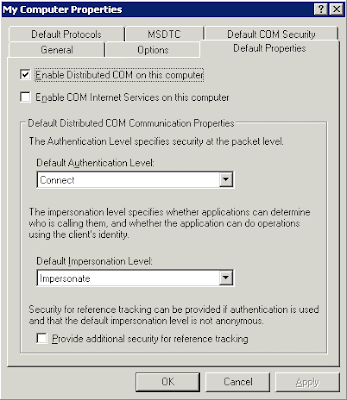
CtxAdmTools: Permissions to Run MFCOM Applications

If you try to run any CtxAdmTools application or MFCOM script on a Citrix server and you receive an error like "You must be a Citrix admin to run this script" following this procedure:

Run the DCOMCNFG tool at a command line prompt.
Click in Component Services, Computers, My Computer
Right-click My Computer .
Click the Default Properties tab.
Verify that Enable Distributed COM on this computer is selected.
Verify that Impersonate is selected in the Default Impersonation Level drop-down list.
Click OK .

Monday, May 11, 2009

CtxAdmTools: CTX Realtime Report v1.1 Released

CTX Realtime Report v1.1 Generate Realtime Reports of the Citrix Farm.

CTX Realtime Report show:
* Applications Sessions (Summary): Show the list of Applications and the Amount of Sessions per Application.
* Applications Sessions (Full): Show the list of Applications and the Amount of Sessions per Application with extra info.
* Applications and Users per Server: Show the list of Applications and Users per Citrix Server.

More reports are coming soon!


Applications Sessions (Summary): Show the list of Applications and the Amount of Sessions per Application.


Applications Sessions (Full): Show the list of Applications and the Amount of Sessions per Application with extra info.

Applications and Users per Server: Show the list of Applications and Users per Server (NEW)


Download Ctx Realtime Report v1.1 at http://ctxadmtools.musumeci.com.ar/

Wednesday, March 04, 2009

CtxAdmTools: HP Proliant Support Pack v1.0 Released!

HP Proliant Support Pack Cleaner v1.0

This FREE tool remove the agents of HP Proliant Support Pack from HP/Compaq Virtualized Servers


NEW Version 1.5 available at http://musumeci.blogspot.com/2010/11/ctxadmtools-hp-proliant-support-pack.html

Download at http://ctxadmtools.musumeci.com.ar

Tuesday, February 24, 2009

CtxAdmTools: CTX Farm Inventory v1.0 Released!

This FREE tool show Hardware and Software of your Citrix Farm or Windows Servers and Export results to Excel File.


Download CTX Farm Inventory at http://ctxadmtools.musumeci.com.ar

Thursday, January 15, 2009

CtxAdmTools: Visual Core Configurator 2008 on Windows 2008 Core R2 (Beta)

How to setup Windows Server 2008 Core R2 (BETA) to run Visual Core Configurator 2008?

Run Start /w ocsetup ServerCore-WOW64
Restart server

Tuesday, January 06, 2009

MS: Windows Update on Windows 2008 Core

Windows 2008 Core don't provide too many options to install Windows Updates. Server Core removes pretty much all of the user interface components. You can enable or disable Windows Update, set Automatic Updates or Turn Off Automatic Updates using scripting, but you can't choose to install specific updates or show availables updates.
Until I released Visual Core Configurator 2008 Beta 2 Refresh.
List all Windows Update available.


Select Windows Updates.

Install Windows Updates.

Download and Install all Windows Updates available.

Enable/Disable Windows Update, Set Automatic Updates


You can download Visual Core Configurator 2008 at http://ctxadmtools.musumeci.com.ar

CtxAdmTools: Visual Core Configurator v1.1 (Beta 2 REFRESH) Released!

Visual Core Configurator 2008 is a FREE tool to Setup and Configure Windows 2008 Core servers.

Today, January 6, 2009, I released the Beta 2 Refresh of Visual Core Configurator 2008.

Build 275 (Beta 2 Refresh) is available for download at http://ctxadmtools.musumeci.com.ar/

You can download the .EXE file package (include extra files) or .ISO file (Best Option for Virtual Machines).This Beta was tested on both versions of Microsoft Windows 2008 Core (x86 and x64) and physical servers, and VMware, Microsoft and XenServer virtual machines.

New Features of this Version: Windows Update


List of Features included in this Build:

Network menu
Network: Show Network Information: Show IP, DNS and NIC configuration
Network: Network Manager: View or change IP, DNS and WINS configuration
Network: Change Computer Name / Domain / Workgroup: Change Computer Name or Join Machine to a Domain or Workgroup

System menu
System: Control Panel: Customize the Operating System (Time and Keyboard)
System: Event Viewer: Display monitoring and troubleshooting messages from Windows
System: Services: Manage Windows Services
System: Screen Saver: Change Screen Saver Configuration
System: Remote Desktop: Configure Remote Desktop (formerly Terminal Server Administration Mode)
System: Video: Configure Screen Resolution
System: Windows Update: Install Windows Updates and HotFixes

Tools menu
Tools: Windows Explorer: Show Files and Folders
Tools: Notepad: Tool to Edit Files
Tools: Registry Editor: Tool to Edit the Registry
Tools: OS Information: Show Operating System Information

Help menu
Help: About: Show the Application Information

Exit menu
Exit: Close Visual Core: Close the Application
Exit: Shutdown: Log Off, Restart or Shutdown the Computer