Edit the file \windows\system32\drivers\etc\hosts and add following lines at the end of the file:
Facebook
127.0.0.1 login.facebook.com
127.0.0.1 www.facebook.com
127.0.0.1 blog.facebook.com
127.0.0.1 apps.facebook.com
127.0.0.1 en-gb.facebook.com
Twitter
127.0.0.1 www.twitter.com
127.0.0.1 twitter.com
Tuesday, April 27, 2010

Thursday, April 22, 2010
MS: Microsoft released Office 2010
Microsoft released today (on MSDN and Technet) Office 2010. The new version is available on 32 and 64bits.
More info www.microsoft.com/office
More info www.microsoft.com/office
Wednesday, April 14, 2010
CTX: How to Forward Credentials from Citrix Access Gateway 4.x or Netscaler to Web Interface 3.x, 4.x, or 5.x.
How to Forward Credentials from Citrix Access Gateway 4.x or Netscaler to Web Interface 3.x, 4.x, or 5.x.
This technote applies to Web Interface 5.3 too. You don't need to enable Pass-Through Authentication on Citrix Presentation Server servers or Citrix XenApp servers to enable single sign on.
http://support.citrix.com/article/CTX106202
This technote applies to Web Interface 5.3 too. You don't need to enable Pass-Through Authentication on Citrix Presentation Server servers or Citrix XenApp servers to enable single sign on.
http://support.citrix.com/article/CTX106202
Thursday, January 07, 2010
MS: Could not load file or assembly 'Microsoft.SqlServer.Sqm
When you try to run SQL 2008 Management Studio on Windows 2008 R2 x64 you receive this error:
Microsoft SQL Server Management Studio
Cannot show requested dialog.
Could not load file or assembly 'Microsoft.SqlServer.Sqm, Version=10.0.0.0, Culture=neutral, PublicKeyToken=89845dcd8080cc91' or one of its dependencies. The module was expected to contain an assembly manifest. (SqlMgmt)
Solution:
Copy the file Microsoft.SqlServer.Sqm.dll located on C:\Program Files\Microsoft SQL Server\100\Shared to folder C:\Program Files\Microsoft SQL Server\100\Tools\Binn\VSShell\Common7\IDE and C:\Program Files (x86)\Microsoft SQL Server\100\Tools\Binn\VSShell\Common7\IDE. The file size inside these 2 folders should be 0 bytes.
Microsoft SQL Server Management Studio
Cannot show requested dialog.
Could not load file or assembly 'Microsoft.SqlServer.Sqm, Version=10.0.0.0, Culture=neutral, PublicKeyToken=89845dcd8080cc91' or one of its dependencies. The module was expected to contain an assembly manifest. (SqlMgmt)
Solution:
Copy the file Microsoft.SqlServer.Sqm.dll located on C:\Program Files\Microsoft SQL Server\100\Shared to folder C:\Program Files\Microsoft SQL Server\100\Tools\Binn\VSShell\Common7\IDE and C:\Program Files (x86)\Microsoft SQL Server\100\Tools\Binn\VSShell\Common7\IDE. The file size inside these 2 folders should be 0 bytes.
Monday, January 04, 2010
CtxAdmTools: HP Proliant Support Pack v1.2 Released!
HP Proliant Support Pack Cleaner v1.2 - This FREE tool remove the agents of HP Proliant Support Pack from HP/Compaq Virtualized Servers
NEW Version 1.5 available at http://musumeci.blogspot.com/2010/11/ctxadmtools-hp-proliant-support-pack.html
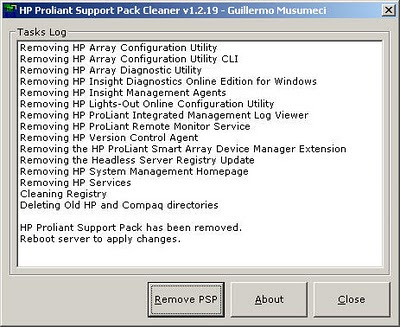 Download at http://ctxadmtools.musumeci.com.ar/
NEW Version 1.5 available at http://musumeci.blogspot.com/2010/11/ctxadmtools-hp-proliant-support-pack.html
 Download at http://ctxadmtools.musumeci.com.ar/
Wednesday, October 14, 2009
MS: Download Multiples Hotfixes for Unattended Installs
I found Windows Updates Downloader an amazing tool to download multiples hotfixes and create an ISO file for unattended installs
Tuesday, September 22, 2009
MS: Enable and Disable Windows 2008 R2 Firewall from Command Line
Disable Windows 2008 R2 Firewall from Command Line:
Domain Profile:
Netsh advfirewall set domainprofile state off
Private Profile:
Netsh advfirewall set privateprofile state off
Public Profile:
Netsh advfirewall set publicprofile state off
To enable the firewall replace the OFF at the end of the sentence for ON.
Domain Profile:
Netsh advfirewall set domainprofile state off
Private Profile:
Netsh advfirewall set privateprofile state off
Public Profile:
Netsh advfirewall set publicprofile state off
To enable the firewall replace the OFF at the end of the sentence for ON.
Monday, September 21, 2009
CTX: Inactive vDisk on Target Device in Citrix Provisioning Server
When you try to copy the content of the target device in Citrix Provisioning Server (PVS) 5.x, the PVS icon show Inactive vDisk status on Target Device.
If you are using DHCP to assign the IP address to devices, you need to configure DHCP options 66 and 67:
1.- Stop Citrix PVS PXE Service on PVS Server.
2.- Open the DHCP Server Management Console and select DHCP server.
3.- In the Toolbar, click Action and select Set Predefined Options from the menu.
4.- Click Add to add the DHCP options.
5.- The Option Type window appears.
6.- Enter the Name:
For option 66, enter Boot Server Host Name (for example: ctxpvs01 or 192.168.100.102 - I prefer using the IP address)
For option 67, enter Bootfile Name (ARDBP32.BIN)
7.- Click OK.
8.- Start Citrix PVS PXE Service on PVS Server.
If you are using DHCP to assign the IP address to devices, you need to configure DHCP options 66 and 67:
1.- Stop Citrix PVS PXE Service on PVS Server.
2.- Open the DHCP Server Management Console and select DHCP server.
3.- In the Toolbar, click Action and select Set Predefined Options from the menu.
4.- Click Add to add the DHCP options.
5.- The Option Type window appears.
6.- Enter the Name:
For option 66, enter Boot Server Host Name (for example: ctxpvs01 or 192.168.100.102 - I prefer using the IP address)
For option 67, enter Bootfile Name (ARDBP32.BIN)
7.- Click OK.
8.- Start Citrix PVS PXE Service on PVS Server.
Friday, August 21, 2009
MS: Install SQL Server 2008 on Windows 2008 R2
Install .NET Framework 3.5.1 on Windows 2008 R2 (Features)
Install SQL Server 2008 with SP1. You must slipstream SP1 on SQL Server 2008 RTM image.
Check How to update or slipstream an installation of SQL Server 2008
http://support.microsoft.com/kb/955392
Install SQL Server 2008 with SP1. You must slipstream SP1 on SQL Server 2008 RTM image.
Check How to update or slipstream an installation of SQL Server 2008
http://support.microsoft.com/kb/955392
Tuesday, August 04, 2009
MS: Always ask before opening this type of file
When you open a link or URL for a file in Internet Explorer (IE) or any browser like FireFox, you will receive this dialog:
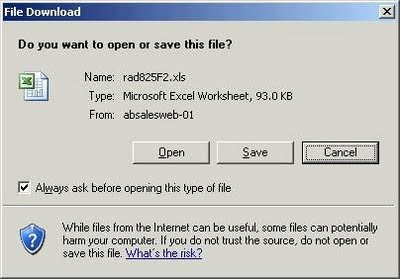
File Download
Do you want to open or save this file?
Three buttons: Open - Save - Cancel
And one checkbox Always ask before opening this type of file
The solution is add (or modify existing) registry key to the machine (you can use a GPO to update several machines)
Microsoft Word 2003 (.doc):
Windows Registry Editor Version 5.00
[HKEY_CLASSES_ROOT\Word.Document.8]
@="Microsoft Word Document"
"EditFlags"=dword:00010000
"BrowserFlags"=dword:00000008
Microsoft Word 2007 (.doc):
Windows Registry Editor Version 5.00
[HKEY_CLASSES_ROOT\Word.Document.8]
@="Microsoft Office Word 97-2003 Document"
"EditFlags"=dword:00010000
"BrowserFlags"=dword:00000008
Word 2007/2010 (.docx):
Windows Registry Editor Version 5.00
[HKEY_CLASSES_ROOT\Word.Document.12]
@="Microsoft Office Word Document"
"EditFlags"=dword:00010000
"BrowserFlags"=dword:00000008
Microsoft Excel 2003 (.xls):
Windows Registry Editor Version 5.00
[HKEY_CLASSES_ROOT\Excel.Sheet.8]
@="Microsoft Excel Worksheet"
"EditFlags"=dword:00010000
"BrowserFlags"=dword:00000008
Microsoft Excel 2007 (.xls):
Windows Registry Editor Version 5.00
[HKEY_CLASSES_ROOT\Excel.Sheet.8]
@="Microsoft Office Excel 97-2003 Worksheet"
"EditFlags"=dword:00010000
"BrowserFlags"=dword:00000008
Excel 2007/2010 (.xlsx):
Windows Registry Editor Version 5.00
[HKEY_CLASSES_ROOT\Excel.Sheet.12]
@="Microsoft Office Excel Worksheet"
"EditFlags"=dword:00010000
"BrowserFlags"=dword:00000008
Adobe Acrobat 7.0
Windows Registry Editor Version 5.00
[HKEY_CLASSES_ROOT\AcroExch.Document]
"BrowseInPlace"="1"
"EditFlags"=dword:00010000
@="Adobe Acrobat 7.0 Document"
"BrowserFlags"=dword:00000008
Adobe Acrobat 9.0
Windows Registry Editor Version 5.00
[HKEY_CLASSES_ROOT\AcroExch.Document]
"BrowseInPlace"="1"
"EditFlags"=dword:00010000
@="Adobe Acrobat Document"
"BrowserFlags"=dword:00000008

File Download
Do you want to open or save this file?
Three buttons: Open - Save - Cancel
And one checkbox Always ask before opening this type of file
The solution is add (or modify existing) registry key to the machine (you can use a GPO to update several machines)
Microsoft Word 2003 (.doc):
Windows Registry Editor Version 5.00
[HKEY_CLASSES_ROOT\Word.Document.8]
@="Microsoft Word Document"
"EditFlags"=dword:00010000
"BrowserFlags"=dword:00000008
Microsoft Word 2007 (.doc):
Windows Registry Editor Version 5.00
[HKEY_CLASSES_ROOT\Word.Document.8]
@="Microsoft Office Word 97-2003 Document"
"EditFlags"=dword:00010000
"BrowserFlags"=dword:00000008
Word 2007/2010 (.docx):
Windows Registry Editor Version 5.00
[HKEY_CLASSES_ROOT\Word.Document.12]
@="Microsoft Office Word Document"
"EditFlags"=dword:00010000
"BrowserFlags"=dword:00000008
Microsoft Excel 2003 (.xls):
Windows Registry Editor Version 5.00
[HKEY_CLASSES_ROOT\Excel.Sheet.8]
@="Microsoft Excel Worksheet"
"EditFlags"=dword:00010000
"BrowserFlags"=dword:00000008
Microsoft Excel 2007 (.xls):
Windows Registry Editor Version 5.00
[HKEY_CLASSES_ROOT\Excel.Sheet.8]
@="Microsoft Office Excel 97-2003 Worksheet"
"EditFlags"=dword:00010000
"BrowserFlags"=dword:00000008
Excel 2007/2010 (.xlsx):
Windows Registry Editor Version 5.00
[HKEY_CLASSES_ROOT\Excel.Sheet.12]
@="Microsoft Office Excel Worksheet"
"EditFlags"=dword:00010000
"BrowserFlags"=dword:00000008
Adobe Acrobat 7.0
Windows Registry Editor Version 5.00
[HKEY_CLASSES_ROOT\AcroExch.Document]
"BrowseInPlace"="1"
"EditFlags"=dword:00010000
@="Adobe Acrobat 7.0 Document"
"BrowserFlags"=dword:00000008
Adobe Acrobat 9.0
Windows Registry Editor Version 5.00
[HKEY_CLASSES_ROOT\AcroExch.Document]
"BrowseInPlace"="1"
"EditFlags"=dword:00010000
@="Adobe Acrobat Document"
"BrowserFlags"=dword:00000008
Friday, July 24, 2009
MS: Open File - Security Warning Dialog
When you have a script or .exe file trying to load .exe file, probably you saw this dialog:
Open File - Security Warning Dialog
The published could not be verified. Are you sure you want to run this software?
You can uncheck the Always ask before opening this file check box, if you have issues on one machine, but if you need to run a new application you can't uncheck 200 citrix servers right?

Wednesday, July 22, 2009
MS: Windows 7 and Windows 2008 R2 are RTM!
Microsoft today announced the release to manufacturing (RTM) of Windows 7 and Windows Server 2008 R2. Windows 7 will be generally available to customers around the world on October 22, and Windows Server 2008 R2 will be generally available on or before that date.
Current customers of the Microsoft Volume Licensing program, MSDN subscribers and TechNet subscribers will be among the first to get customer access to Windows 7 and Windows Server 2008 R2 in August 6th.
http://www.microsoft.com/windows/default.aspx
http://www.microsoft.com/windowsserver2008/en/us/R2.aspx
Current customers of the Microsoft Volume Licensing program, MSDN subscribers and TechNet subscribers will be among the first to get customer access to Windows 7 and Windows Server 2008 R2 in August 6th.
http://www.microsoft.com/windows/default.aspx
http://www.microsoft.com/windowsserver2008/en/us/R2.aspx
Monday, June 29, 2009
CTX: Best Practices for Citrix XenApp Hotfix Rollup Pack Installation and Deployment
Best Practices for Citrix XenApp Hotfix Rollup Pack Installation and Deployment
This article introduces and discusses some of the best practices for installing and deploying a Hotfix Rollup Pack for XenApp 5.0 for Windows Server 2003 and Presentation Server 4.5.
Friday, June 26, 2009
MS: Could not reconnect all network drives
To fix the Balloon error on Taskbar: Could not reconnect all network drives:
Start > Run > type Regedit
HKEY_CURRENT_USER\Software\Microsoft\Windows\CurrentVersion\Explorer\MountPoints2
Check the Network Drive(s) and then delete registry key(s)

Start > Run > type Regedit
HKEY_CURRENT_USER\Software\Microsoft\Windows\CurrentVersion\Explorer\MountPoints2
Check the Network Drive(s) and then delete registry key(s)

Thursday, June 25, 2009
CtxAdmTools: List HotFix v2.0 Updated!
List HotFix v2.0 - Release Date: June 16, 2009 - This FREE tool list all Citrix and Microsoft Hot Fixes installed in your Citrix farm or local and remote Windows servers
Last week I was on a call with Citrix technical support and they ask me: Do you have MS hotfix KBXXXXXX installed on the server with issues? Do you have Citrix patch PSE450R01W2K3XXX installed? I don’t know.
Few hours later I was writing List HotFix v2.0, a new tool to search for this info. List HotFix was developed from scratch. The old List HotFix show only citrix hotfixes in the entire Citrix farm.
This version show the Citrix/MS hotfixes list from a Citrix servers on a farm, Active Directory computers, text files, etc.
With the FREE List HotFix v2.0, you can list all Citrix and Microsoft Hot Fixes / Patches / Updates installed on your Citrix farm or local and remote Windows/Citrix servers, search for a specific HotFix and export the results to Excel files.
List HotFix v2.0 requires .NET Framework v2.0 or later.
Download List HotFix v2.0 from http://ctxadmtools.musumeci.com.ar/

Search for an specific HotFix:

Export results to Excel Files:

Last week I was on a call with Citrix technical support and they ask me: Do you have MS hotfix KBXXXXXX installed on the server with issues? Do you have Citrix patch PSE450R01W2K3XXX installed? I don’t know.
Few hours later I was writing List HotFix v2.0, a new tool to search for this info. List HotFix was developed from scratch. The old List HotFix show only citrix hotfixes in the entire Citrix farm.
This version show the Citrix/MS hotfixes list from a Citrix servers on a farm, Active Directory computers, text files, etc.
With the FREE List HotFix v2.0, you can list all Citrix and Microsoft Hot Fixes / Patches / Updates installed on your Citrix farm or local and remote Windows/Citrix servers, search for a specific HotFix and export the results to Excel files.
List HotFix v2.0 requires .NET Framework v2.0 or later.
Download List HotFix v2.0 from http://ctxadmtools.musumeci.com.ar/
Search for an specific HotFix:

Export results to Excel Files:
Wednesday, June 24, 2009
CtxAdmTools: AD Show User Groups v1.0 Released!
AD Show User Groups is a FREE tool inspired by these typical calls from Support Engineers or Technical Analyst: can you send me a list of Active Directory groups for this user?
AD Show User Groups show Group Membership of a specific AD User and export results to a text file.
Download AD Show User Groups from http://ctxadmtools.musumeci.com.ar/

AD Show User Groups show Group Membership of a specific AD User and export results to a text file.
Download AD Show User Groups from http://ctxadmtools.musumeci.com.ar/

Monday, June 15, 2009
MS: IPSEC error: The system cannot find the file specified
Event Type: Error
Event Source: Service Control Manager
Event Category: None
Event ID: 7023
Description:
The IPSEC Services service terminated with the following error:
The system cannot find the file specified.
Solution:
Click Start, click Run, type regsvr32 polstore.dll
Event Source: Service Control Manager
Event Category: None
Event ID: 7023
Description:
The IPSEC Services service terminated with the following error:
The system cannot find the file specified.
Solution:
Click Start, click Run, type regsvr32 polstore.dll
Wednesday, June 10, 2009
CTX: How detect if an application is running through Citrix?
To detect if an application is running through Citrix or Terminal Server use the .NET code below in your application.
System.Windows.Forms.SystemInformation.TerminalServerSession
True = running on TS or Citrix
To check inside on your VB6 application:
Private Declare Function GetSystemMetrics Lib "user32.dll" (ByVal nIndex As Long) As Long
Const SM_REMOTESESSION = &H1000
if GetSystemMetrics(SM_REMOTESESSION)<>0 then MsgBox "Running on Citrix/Terminal Server"
System.Windows.Forms.SystemInformation.TerminalServerSession
True = running on TS or Citrix
To check inside on your VB6 application:
Private Declare Function GetSystemMetrics Lib "user32.dll" (ByVal nIndex As Long) As Long
Const SM_REMOTESESSION = &H1000
if GetSystemMetrics(SM_REMOTESESSION)<>0 then MsgBox "Running on Citrix/Terminal Server"
Tuesday, May 26, 2009
MS: Microsoft releases Windows Server 2008 and Vista Service Pack 2
Microsoft has released a Five Language Standalone Installer for Windows Server 2008 SP2 and Windows Vista SP2 today. Windows Server 2008 SP2 and Windows Vista Service Pack 2 can be installed on based systems with any of the following language versions: English, French, German, Japanese, or Spanish.
Download: Vista SP2/Server 2008 SP2 x86
Download: Vista SP2/Server 2008 SP2 x64
Download: Vista SP2/Server 2008 SP2 x86
Download: Vista SP2/Server 2008 SP2 x64
Wednesday, May 20, 2009
MS: GPRESULT Access Denied Error
Open Command Prompt and paste following commands:
cd /d %windir%\system32
regsvr32 /n /I userenv.dll
cd wbem
mofcomp scersop.mof
gpupdate /force
gpresult
or create a .cmd file and copy the script below
cd /d %windir%\system32
start /wait regsvr32 /n /I userenv.dll
cd wbem
start /wait mofcomp scersop.mof
gpupdate /force
gpresult
cd /d %windir%\system32
regsvr32 /n /I userenv.dll
cd wbem
mofcomp scersop.mof
gpupdate /force
gpresult
or create a .cmd file and copy the script below
cd /d %windir%\system32
start /wait regsvr32 /n /I userenv.dll
cd wbem
start /wait mofcomp scersop.mof
gpupdate /force
gpresult
Subscribe to:
Posts (Atom)